Maximizing Website Performance with Content Caching: Best Practices and Policies
In the fast-paced world of web development, ensuring optimal website performance is paramount to providing users with a seamless browsing experience. Content caching is a fundamental technique used to improve website speed and responsiveness by storing frequently accessed data and serving it to users more efficiently. In this comprehensive guide, we'll delve into the concept of content caching, explore its benefits, and outline best practices and policies for implementing effective content caching strategies in web development.
Understanding Content Caching
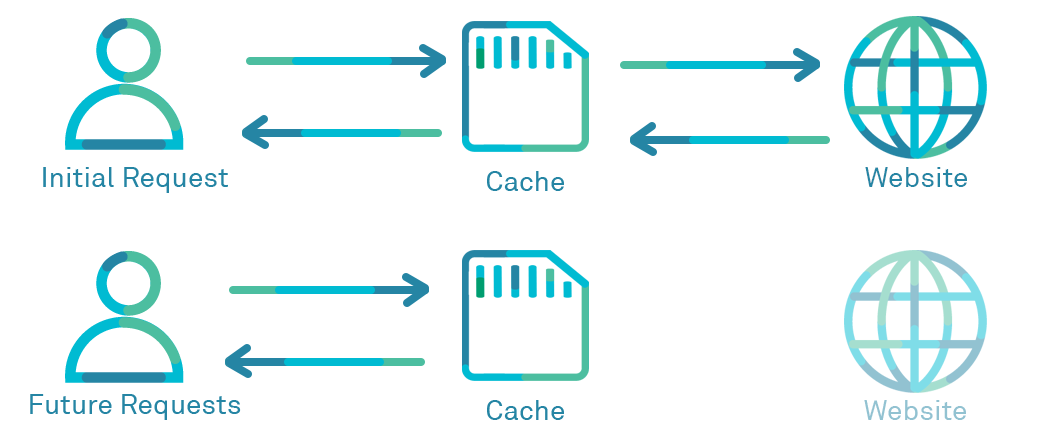
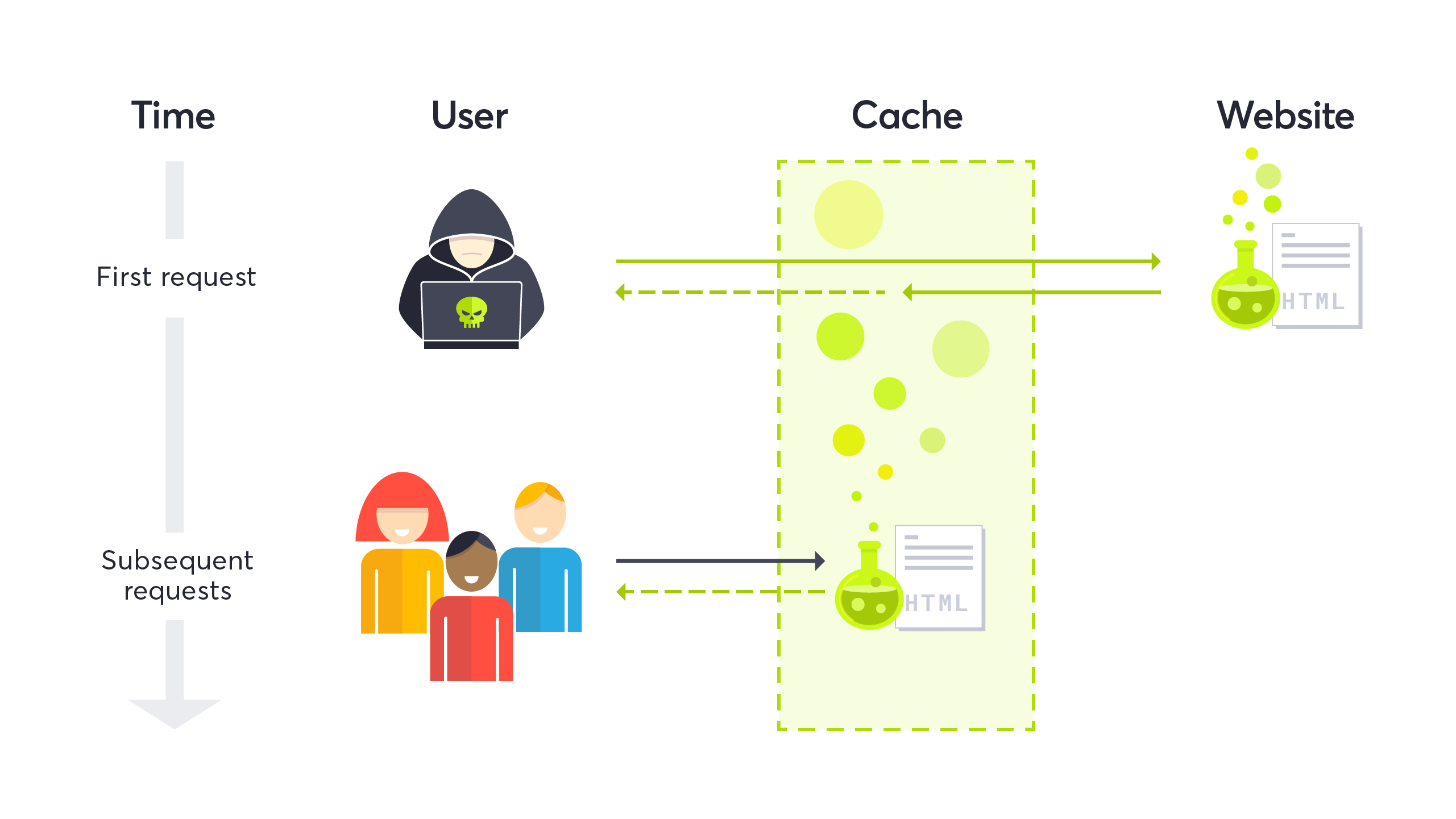
Content caching involves storing copies of web page elements, such as HTML files, images, CSS stylesheets, and JavaScript files, on servers or client devices for faster retrieval and delivery. When a user accesses a web page, the browser or server checks if the requested content is already cached locally. If found, the content is served directly from the cache, eliminating the need to fetch it from the origin server, thereby reducing latency and improving website performance
Benefits of Content Caching
Implementing content caching offers several benefits for website performance and user experience:
- Improved Loading Times: Caching commonly accessed content reduces the time required to load web pages, resulting in faster loading times and enhanced user satisfaction.
- Reduced Server Load: By serving cached content directly from local storage, content caching reduces the load on origin servers, improving server efficiency and scalability.
- Bandwidth Conservation: Caching static assets like images and scripts conserves bandwidth by minimizing the amount of data transferred between servers and clients, particularly beneficial for high-traffic websites.
- Enhanced Scalability: Content caching facilitates horizontal scalability by distributing cached content across multiple cache servers, enabling websites to handle increased traffic and scale dynamically.

In a context where an API utilizes a database to serve content, several types of content can be potentially cached to improve performance and reduce the load on the database. Some common types of content that can be cached include:
- Query Results: Cached responses to frequently executed database queries can significantly reduce the overhead of repetitive database operations. This includes caching the results of read-heavy queries that fetch data from the database, such as fetching user profiles, product listings, or articles.
- Aggregated Data: If the API computes aggregated data, such as statistical summaries, analytics reports, or leaderboard rankings, caching the pre-computed results can eliminate the need to recalculate them on every request. This can be particularly beneficial for complex queries that involve aggregations or computations over large datasets.
- Static Content: Static content, such as images, CSS files, JavaScript libraries, and other non-dynamic assets, can be cached at the API level or using a Content Delivery Network (CDN). By caching static content, you can reduce bandwidth usage and improve response times, especially for clients located far from the server.
- Session Data: If the API relies on session data or user-specific information that doesn't change frequently, caching this data can help reduce the need to access the database for every request. This could include user authentication tokens, session state, or user preferences.
- Authentication and Authorization Tokens: Caching authentication and authorization tokens can help minimize the overhead of validating user credentials or permissions on every request. By caching tokens, you can quickly verify user identity and access rights without hitting the database or external authentication services.
- API Responses: Responses generated by the API endpoint can be cached to avoid repeating expensive computations or data processing steps. This is particularly useful for endpoints that generate static or semi-static content, such as search results, recommendations, or frequently accessed resources.
- Metadata: Metadata associated with database entities, such as schema information, data dictionaries, or configuration settings, can be cached to improve the efficiency of schema introspection or metadata-driven operations.

Overall, the key principle behind content caching in an API that uses a database is to identify and cache data that is accessed frequently, relatively static or semi-static, and expensive to compute or fetch from the database. By strategically caching content at various layers of the API stack, you can optimize performance, reduce latency, and enhance scalability.
Best Practices for Content Caching
To maximize the benefits of content caching, developers should adhere to best practices and implement effective caching policies and rules:
Leverage Browser Caching
Set appropriate cache-control headers and expiration times for static assets to instruct web browsers to store cached copies locally. Configure caching directives like Cache-Control and Expires headers to control how long browsers retain cached content before requesting fresh updates from the server.
Implement CDN Caching
Utilize Content Delivery Networks (CDNs) to cache and serve static assets from edge locations closer to end-users. CDNs employ caching servers strategically distributed worldwide, reducing latency and improving content delivery speed for geographically dispersed users.
Cache Static Assets
Cache static assets such as images, CSS files, JavaScript libraries, and font files to reduce load times and minimize server requests. Configure caching policies to cache these assets aggressively, as they typically do not change frequently.
Set Cache-Control Directives
Use cache-control directives like max-age, s-maxage, and public/private to specify caching behavior and control cache freshness. Set appropriate expiration times based on content volatility and update frequency to balance caching efficiency with content freshness.
Invalidate Cache Strategically
Implement cache invalidation strategies to ensure that cached content remains up-to-date and reflects recent changes. Use cache-busting techniques like versioning file names or appending query strings with version numbers to force cache revalidation when content is updated.
Dynamic Content Caching
Cache dynamically generated content intelligently to balance caching efficiency with data freshness. Use caching layers and caching proxies to cache dynamic content at the edge while ensuring timely updates from origin servers.
Monitor Cache Performance
Regularly monitor cache performance metrics like cache hit ratio, cache miss ratio, and cache latency to assess caching effectiveness and identify opportunities for optimization. Use caching analytics and monitoring tools to track cache utilization and troubleshoot caching issues proactively.
Caching plays a pivotal role in maximizing API performance by reducing response times and alleviating the burden on backend servers. By storing frequently accessed data in memory or a distributed cache, caching mechanisms eliminate the need to repeatedly fetch data from the database or perform expensive computations on every request. Let's delve deeper into the various aspects of caching and how it can significantly enhance API performance:
Types of Caching
Client-Side Caching: In client-side caching, the client application stores cached responses locally, reducing the need to make redundant API requests. This can be achieved using browser caching mechanisms or client-side storage options such as local storage or IndexedDB.
Server-Side Caching: Server-side caching involves storing cached responses on the server side, typically in memory or a distributed cache such as Redis or Memcached. This allows subsequent requests for the same data to be served directly from the cache without hitting the backend.
CDN Caching: Content Delivery Networks (CDNs) cache static assets and API responses at edge locations worldwide, ensuring fast and reliable delivery to users regardless of their geographical location. CDNs reduce latency and offload traffic from origin servers, improving overall API performance.
Cache Invalidation
One of the key challenges in caching is ensuring that cached data remains fresh and reflects the latest updates from the backend. Cache invalidation mechanisms address this challenge by removing or updating cached entries when underlying data changes. Common cache invalidation strategies include:
Time-Based Expiration: Set expiration times for cached entries, after which they are considered stale and invalidated. This ensures that cached data is periodically refreshed to reflect changes.
Event-Based Invalidation: Invalidate cached entries in response to specific events or triggers, such as database updates or cache purge requests. This approach ensures that cached data remains synchronized with the backend in real-time.
Cache-Control Headers: Use Cache-Control headers in HTTP responses to specify caching directives such as max-age, must-revalidate, and no-cache, controlling how clients and intermediary caches cache and revalidate responses.
Cache Strategies
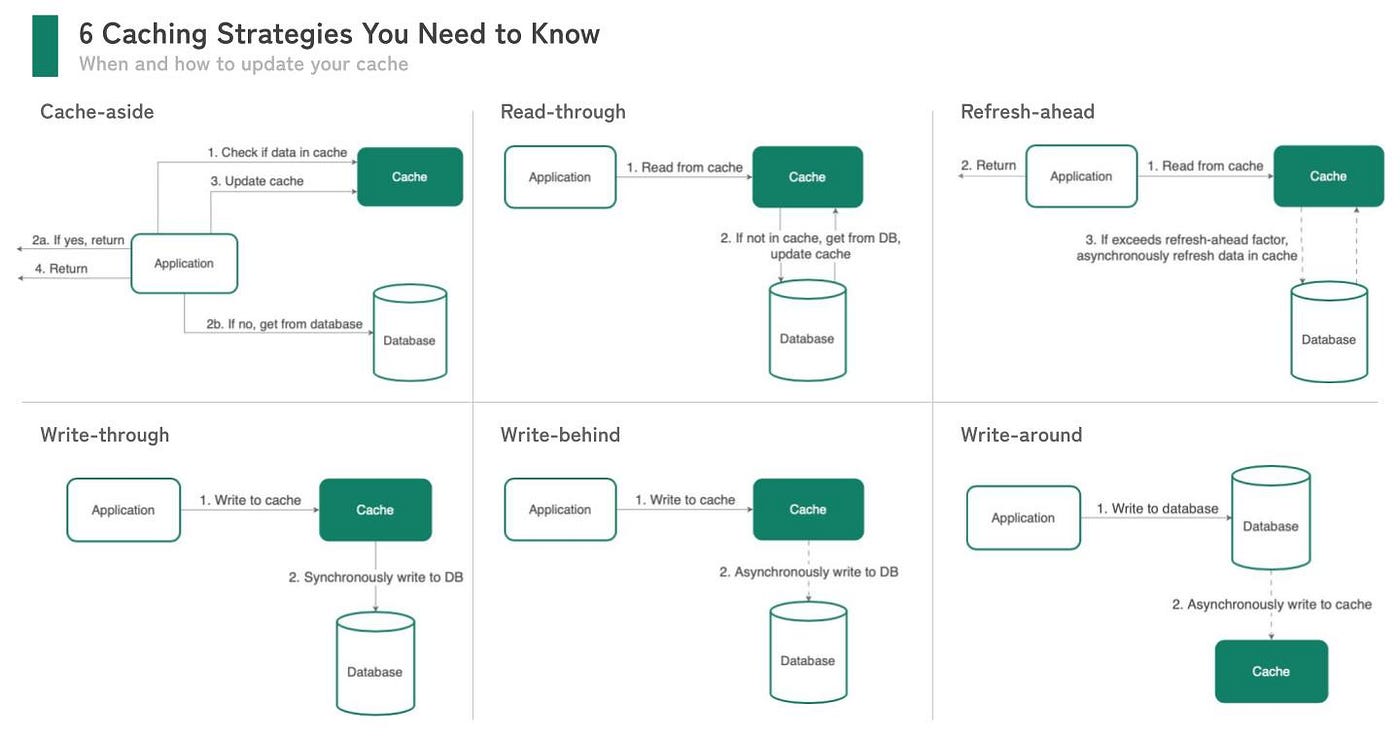
Cache-Aside (Lazy Loading): In the cache-aside pattern, the application first checks the cache for the requested data. If the data is found in the cache, it is returned to the client. If not, the application fetches the data from the backend, stores it in the cache, and then returns it to the client. Subsequent requests for the same data are served directly from the cache.
Write-Through: In the write-through pattern, data is written to both the cache and the backend simultaneously. This ensures that cached data is always up-to-date with the backend, but it may incur higher write latency due to the dual write operations.
Cache-Through: Cache-through combines aspects of cache-aside and write-through patterns, where data is written to the cache on read misses and written back to the cache on write operations. This balances read performance with the freshness of cached data.
Cache Consideration
Cache Key Design: Account for cold starts when using in-memory caches, where cache entries may need to be populated or loaded into memory upon startup. Implement warm-up mechanisms to pre-populate caches and minimize cold start latency.
Cache Size and Eviction Policies: Monitor cache size and implement eviction policies to manage memory usage and prevent cache overflow. Common eviction policies include Least Recently Used (LRU), Least Frequently Used (LFU), and Time-To-Live (TTL) expiration.
Cold Start Considerations: Account for cold starts when using in-memory caches, where cache entries may need to be populated or loaded into memory upon startup. Implement warm-up mechanisms to pre-populate caches and minimize cold start latency.
By leveraging caching effectively, API developers can significantly improve response times, reduce server load, and enhance overall scalability and reliability. However, it's essential to strike a balance between caching benefits and potential drawbacks such as cache staleness and invalidation complexity. With careful planning, implementation, and monitoring, caching can be a powerful tool for optimizing API performance and delivering exceptional user experiences.
Content caching is a cornerstone of web performance optimization, offering significant benefits for website speed, scalability, and user experience. By implementing best practices and adhering to caching policies and rules, developers can leverage content caching to improve website performance, reduce server load, and enhance user satisfaction. Embracing caching techniques and strategies empowers web developers to deliver faster, more responsive websites that meet the demands of today's digital users.
Thanks a lot for reading this article. If you like this post, please subscribe to our newsletter to get your weekly dose of financial advice straight into your inbox. Follow us on Twitter for regular updates!
2 Comments
Jordan Singer
2d2 replies
Santiago Roberts
4d